 Benjamin WoodruffandGitHub
2d44d0dcd1
Copied from https://turbopack-rust-docs.vercel.sh/turbopack/chunking.html I had claude review it for correctness against the code. It found a few things where the names weren't correct or a trait was actually a struct, and it grouped things into sections. It also added some more details to a few sections, like the dev vs production chunking. I think this is a reasonable improvement. I did a second pass with claude where I had it remove things it 1:1 duplicated with the existing rustdocs, and I had it add intradoc links. Rendered: 

5.6 KiB
Chunking is the process that decides which modules are placed into which bundles, and the relationship between these bundles.
For this process a few intermediate concepts are used:
ChunkingContext: A context trait which controls the chunking process.ChunkItem: A derived object from aModulewhich combines the module with theChunkingContextandModuleGraph.ChunkableModule: A trait which defines how a specificModulecan be converted into aChunkItem.ModuleReference::chunking_type(): A method on theModuleReferencetrait returningOption<ChunkingType>, which defines how a reference interacts with chunking. References returningNoneare not followed during the chunking graph walk.ChunkType: A trait which defines how to create aChunkfromChunkItems.Chunk: A trait which represents a bundle ofChunkItems.
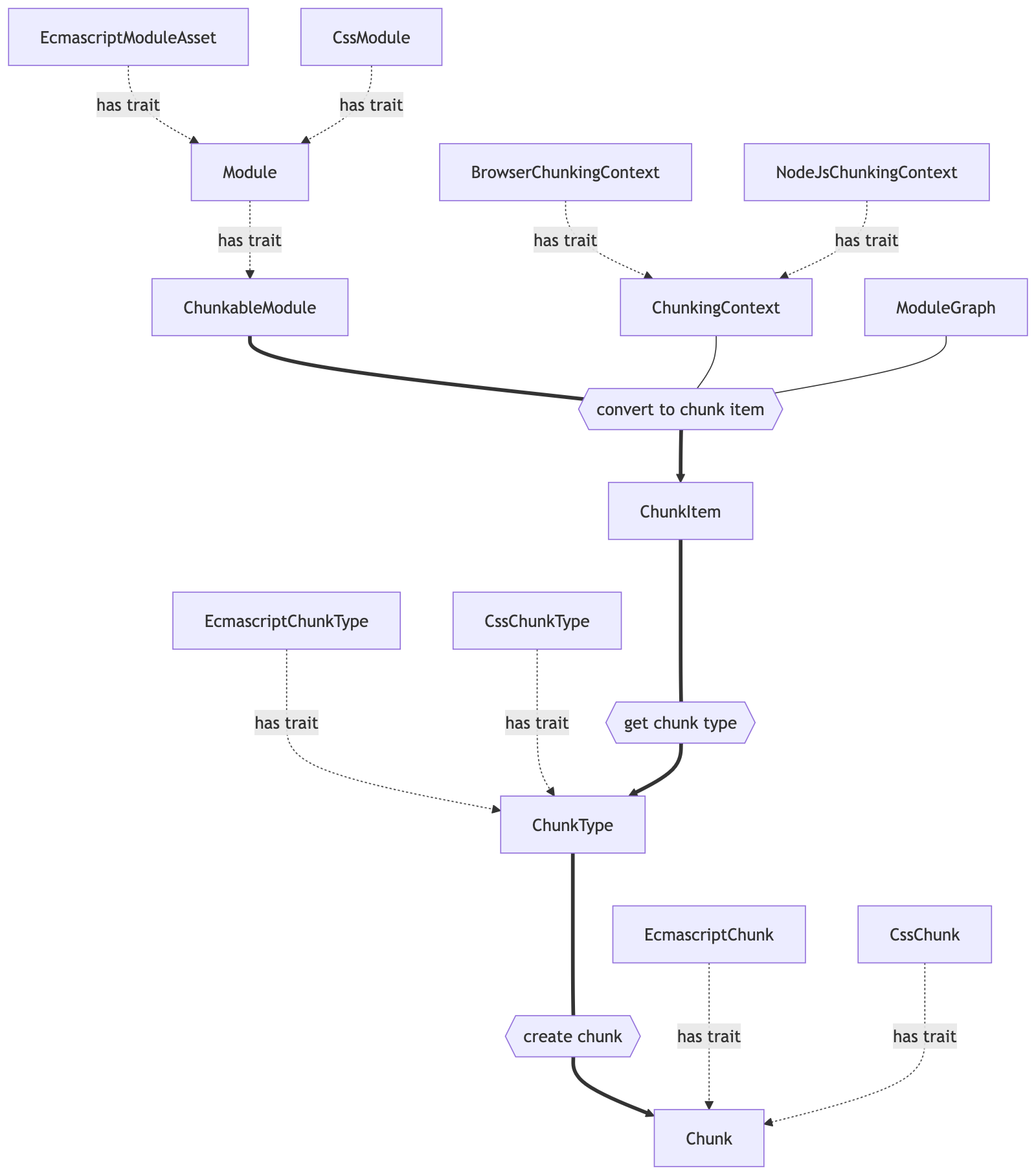
Graph Walk
A Module must implement the ChunkableModule trait to be considered for chunking. References returned by a module that have a non-None chunking_type() are followed during the chunking graph walk. The ChunkingType enum controls how each reference is handled.
The chunking algorithm walks the module graph via a DFS traversal following these chunkable references to find all modules that should be bundled together.
Module Batching
Before modules become chunk items, they may be grouped into module batches (ModuleBatch). This intermediate batching layer groups related modules together. Batches are organized into batch groups (ModuleBatchGroup) which are carried through the chunking process.
Module Merging (Scope Hoisting)
Modules implementing the MergeableModule trait can be merged together (scope hoisting). When module merging is enabled on the ChunkingContext, multiple modules may be combined into a single module before chunk item creation, reducing the number of individual chunk items and improving runtime performance.
Chunk Item Creation
Modules (or module batches) are converted into ChunkItems via ChunkableModule::as_chunk_item().
Chunk Splitting
A splitting algorithm decides which ChunkItems are placed into which Chunks. Only ChunkItems with the same ChunkType can be placed into the same Chunk. Beyond that, the splitting strategy differs between development and production:
Development mode splits chunks using a hierarchical strategy:
- App code vs. vendor code (based on
node_modulespath presence) - Package name within vendor code
- Directory structure within app code
- Size thresholds to avoid overly small or large chunks
Production mode splits chunks based on:
- Chunk group membership: modules are grouped by which pages/entries they belong to, so modules shared by the same set of pages end up together.
- Size constraints:
ChunkingConfigcontrols merging of small chunks and splitting of large ones.
Once the ChunkItems that should be placed together are determined, a Chunk is created for each group by calling ChunkType::chunk().
Output
An OutputAsset is generated for each Chunk. The ChunkingContext implementation decides how each Chunk is transformed into an OutputAsset (e.g. BrowserChunkingContext wraps EcmascriptChunks in an EcmascriptBrowserChunk that adds runtime loading code). CssChunks directly implement OutputAsset. These OutputAssets that are loaded together form a chunk group.
Available Modules
The chunking process tracks which modules are already available in parent chunk groups via AvailableModules, to avoid duplication in nested chunk groups.