mirror of
https://github.com/hanzoai/next.js.git
synced 2026-10-30 14:46:38 +00:00
 e513488d0d
## Summary
- add a prominent note in the App Router Caching guide about runtime
behavior on serverless deployments
- clarify that `use cache` runtime entries are in-memory and may not
persist across requests when requests hit different instances
- link directly to `use cache: remote` as the durable/shared runtime
caching option

Closes #91959

## Verification
- **Manual/source verification**
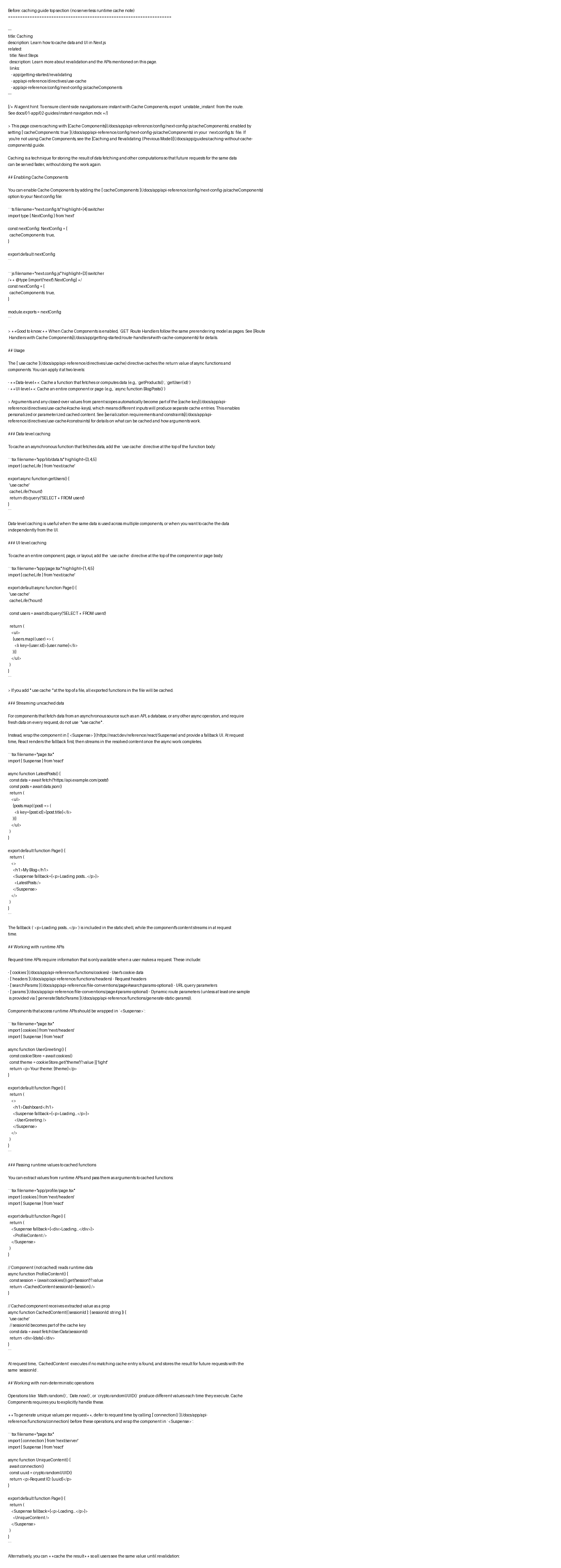
- Confirmed before change there was no mention of serverless runtime
cache persistence in `docs/app/getting-started/caching`.
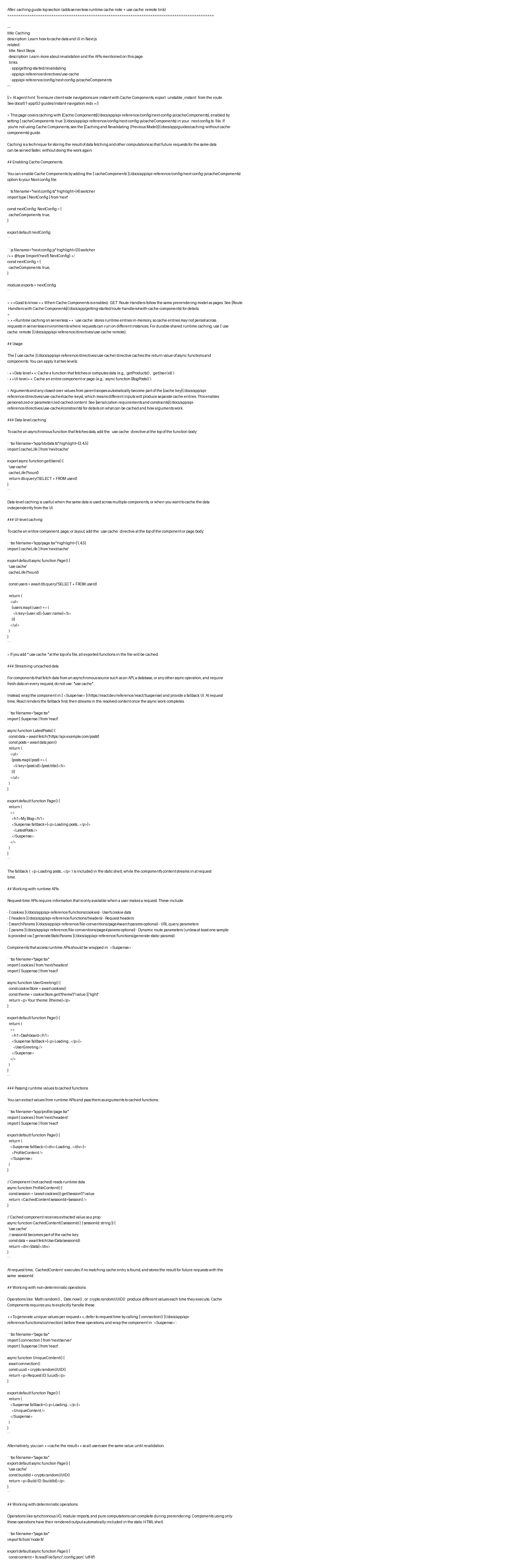
- Confirmed after change the new callout appears immediately under the
existing “Good to know” note in
`docs/01-app/01-getting-started/08-caching.mdx`.
- **Evidence screenshots (before/after + verification)**
- Before:
https://raw.githubusercontent.com/wwenrr/pr-evidence-images/main/next.js/issue-91959/2026-04-01/before.png
- After:
https://raw.githubusercontent.com/wwenrr/pr-evidence-images/main/next.js/issue-91959/2026-04-01/after.png
- Verification keyword check:
https://raw.githubusercontent.com/wwenrr/pr-evidence-images/main/next.js/issue-91959/2026-04-01/verification.png

## Notes
- Formatting toolchain was not run in this environment because `pnpm` is
unavailable on host (`pnpm: not found`).
- Change is a minimal docs-only edit (single file, two inserted lines in
a callout block).

---------

Co-authored-by: wwenrr <[email protected]>
Co-authored-by: Joseph Chamochumbi <[email protected]>
Co-authored-by: Joseph <[email protected]>

197 lines
8.2 KiB
Plaintext
197 lines
8.2 KiB
Plaintext
---
|
|
title: Revalidating
|
|
description: Learn how to revalidate cached data using time-based and on-demand strategies.
|
|
related:
|
|
title: API Reference
|
|
description: Learn more about the APIs mentioned on this page.
|
|
links:
|
|
- app/api-reference/functions/cacheLife
|
|
- app/api-reference/functions/cacheTag
|
|
- app/api-reference/functions/revalidateTag
|
|
- app/api-reference/functions/updateTag
|
|
- app/api-reference/functions/revalidatePath
|
|
---
|
|
|
|
> This page covers revalidation with [Cache Components](/docs/app/api-reference/config/next-config-js/cacheComponents), enabled by setting [`cacheComponents: true`](/docs/app/api-reference/config/next-config-js/cacheComponents) in your `next.config.ts` file. If you're not using Cache Components, see the [Caching and Revalidating (Previous Model)](/docs/app/guides/caching-without-cache-components) guide.
|
|
|
|
Revalidation is the process of updating cached data. It lets you keep serving fast, cached responses while ensuring content stays fresh. There are two strategies:
|
|
|
|
- **Time-based revalidation**: Automatically refresh cached data after a set duration using [`cacheLife`](#cachelife).
|
|
- **On-demand revalidation**: Manually invalidate cached data after a mutation using [`revalidateTag`](#revalidatetag), [`updateTag`](#updatetag), or [`revalidatePath`](#revalidatepath).
|
|
|
|
## `cacheLife`
|
|
|
|
[`cacheLife`](/docs/app/api-reference/functions/cacheLife) controls how long cached data remains valid. Use it inside a [`use cache`](/docs/app/api-reference/directives/use-cache) scope to set the cache lifetime.
|
|
|
|
```tsx filename="app/lib/data.ts" highlight={1,4,5}
|
|
import { cacheLife } from 'next/cache'
|
|
|
|
export async function getProducts() {
|
|
'use cache'
|
|
cacheLife('hours')
|
|
return db.query('SELECT * FROM products')
|
|
}
|
|
```
|
|
|
|
`cacheLife` accepts a profile name or a custom configuration object:
|
|
|
|
| Profile | `stale` | `revalidate` | `expire` |
|
|
| --------- | ------- | ------------ | ----------- |
|
|
| `seconds` | 0 | 1s | 60s |
|
|
| `minutes` | 5m | 1m | 1h |
|
|
| `hours` | 5m | 1h | 1d |
|
|
| `days` | 5m | 1d | 1w |
|
|
| `weeks` | 5m | 1w | 30d |
|
|
| `max` | 5m | 30d | ~indefinite |
|
|
|
|
For fine-grained control, pass an object:
|
|
|
|
```tsx highlight={2-6}
|
|
'use cache'
|
|
cacheLife({
|
|
stale: 3600, // 1 hour until considered stale
|
|
revalidate: 7200, // 2 hours until revalidated
|
|
expire: 86400, // 1 day until expired
|
|
})
|
|
```
|
|
|
|
> **Good to know:** A cache is considered "short-lived" when it uses the `seconds` profile, `revalidate: 0`, or `expire` under 5 minutes. Short-lived caches are automatically excluded from prerenders and become dynamic holes instead. See [Prerendering behavior](/docs/app/api-reference/functions/cacheLife#prerendering-behavior) for details.
|
|
|
|
See the [`cacheLife` API reference](/docs/app/api-reference/functions/cacheLife) for all profiles and custom configuration options.
|
|
|
|
## `cacheTag`
|
|
|
|
[`cacheTag`](/docs/app/api-reference/functions/cacheTag) lets you tag cached data so it can be invalidated on-demand. Use it inside a [`use cache`](/docs/app/api-reference/directives/use-cache) scope:
|
|
|
|
```tsx filename="app/lib/data.ts" switcher
|
|
import { cacheTag } from 'next/cache'
|
|
|
|
export async function getProducts() {
|
|
'use cache'
|
|
cacheTag('products')
|
|
return db.query('SELECT * FROM products')
|
|
}
|
|
```
|
|
|
|
```jsx filename="app/lib/data.js" switcher
|
|
import { cacheTag } from 'next/cache'
|
|
|
|
export async function getProducts() {
|
|
'use cache'
|
|
cacheTag('products')
|
|
return db.query('SELECT * FROM products')
|
|
}
|
|
```
|
|
|
|
Once tagged, invalidate the cache using [`revalidateTag`](#revalidatetag) or [`updateTag`](#updatetag).
|
|
|
|
See the [`cacheTag` API reference](/docs/app/api-reference/functions/cacheTag) to learn more.
|
|
|
|
## `revalidateTag`
|
|
|
|
`revalidateTag` invalidates cache entries by tag using stale-while-revalidate semantics — stale content is served immediately while fresh content loads in the background. This is ideal for content where a slight delay in updates is acceptable, like blog posts or product catalogs.
|
|
|
|
```tsx filename="app/lib/actions.ts" highlight={1,5} switcher
|
|
import { revalidateTag } from 'next/cache'
|
|
|
|
export async function updateUser(id: string) {
|
|
// Mutate data
|
|
revalidateTag('user', 'max') // Recommended: stale-while-revalidate
|
|
}
|
|
```
|
|
|
|
```jsx filename="app/lib/actions.js" highlight={1,5} switcher
|
|
import { revalidateTag } from 'next/cache'
|
|
|
|
export async function updateUser(id) {
|
|
// Mutate data
|
|
revalidateTag('user', 'max') // Recommended: stale-while-revalidate
|
|
}
|
|
```
|
|
|
|
You can reuse the same tag in multiple functions to revalidate them all at once. Call `revalidateTag` in a [Server Action](/docs/app/getting-started/mutating-data) or [Route Handler](/docs/app/api-reference/file-conventions/route).
|
|
|
|
> **Good to know:** The second argument sets how long stale content can be served while fresh content generates in the background. Once it expires, subsequent requests block until fresh content is ready. Using `'max'` gives the longest stale window.
|
|
|
|
See the [`revalidateTag` API reference](/docs/app/api-reference/functions/revalidateTag) to learn more.
|
|
|
|
## `updateTag`
|
|
|
|
`updateTag` immediately expires cached data for read-your-own-writes scenarios — the user sees their change right away instead of stale content. Unlike `revalidateTag`, it can only be used in [Server Actions](/docs/app/getting-started/mutating-data).
|
|
|
|
```tsx filename="app/lib/actions.ts" highlight={1,12} switcher
|
|
import { updateTag } from 'next/cache'
|
|
import { redirect } from 'next/navigation'
|
|
|
|
export async function createPost(formData: FormData) {
|
|
const post = await db.post.create({
|
|
data: {
|
|
title: formData.get('title'),
|
|
content: formData.get('content'),
|
|
},
|
|
})
|
|
|
|
updateTag('posts')
|
|
redirect(`/posts/${post.id}`)
|
|
}
|
|
```
|
|
|
|
```jsx filename="app/lib/actions.js" highlight={1,12} switcher
|
|
import { updateTag } from 'next/cache'
|
|
import { redirect } from 'next/navigation'
|
|
|
|
export async function createPost(formData) {
|
|
const post = await db.post.create({
|
|
data: {
|
|
title: formData.get('title'),
|
|
content: formData.get('content'),
|
|
},
|
|
})
|
|
|
|
updateTag('posts')
|
|
redirect(`/posts/${post.id}`)
|
|
}
|
|
```
|
|
|
|
| | `updateTag` | `revalidateTag` |
|
|
| ------------ | --------------------------------------------- | ------------------------------------ |
|
|
| **Where** | Server Actions only | Server Actions and Route Handlers |
|
|
| **Behavior** | Immediately expires cache | Stale-while-revalidate |
|
|
| **Use case** | Read-your-own-writes (user sees their change) | Background refresh (slight delay OK) |
|
|
|
|
See the [`updateTag` API reference](/docs/app/api-reference/functions/updateTag) to learn more.
|
|
|
|
## `revalidatePath`
|
|
|
|
`revalidatePath` invalidates all cached data for a specific route path. Use it when you want to revalidate a route without knowing which tags are associated with it.
|
|
|
|
```tsx filename="app/lib/actions.ts" highlight={1,5} switcher
|
|
import { revalidatePath } from 'next/cache'
|
|
|
|
export async function updateUser(id: string) {
|
|
// Mutate data
|
|
revalidatePath('/profile')
|
|
}
|
|
```
|
|
|
|
```jsx filename="app/lib/actions.js" highlight={1,5} switcher
|
|
import { revalidatePath } from 'next/cache'
|
|
|
|
export async function updateUser(id) {
|
|
// Mutate data
|
|
revalidatePath('/profile')
|
|
}
|
|
```
|
|
|
|
> **Good to know**: Prefer tag-based revalidation (`revalidateTag`/`updateTag`) over path-based when possible — it's more precise and avoids over-invalidating.
|
|
|
|
See the [`revalidatePath` API reference](/docs/app/api-reference/functions/revalidatePath) to learn more.
|
|
|
|
## What should I cache?
|
|
|
|
Cache data that doesn't depend on [runtime data](/docs/app/getting-started/caching#working-with-runtime-apis) and that you're OK serving from cache for a period of time. Use `use cache` with `cacheLife` to describe that behavior.
|
|
|
|
For content management systems with update mechanisms, use tags with longer cache durations and rely on `revalidateTag` to refresh content when it actually changes, rather than expiring the cache preemptively.
|
|
|
|
> **Good to know:** In serverless environments, in-memory cache entries may not persist across revalidations. See [runtime caching considerations](/docs/app/api-reference/directives/use-cache#runtime-caching-considerations) for details.
|