 zeekay
241ca6dc59
zeekay
241ca6dc59
README: PyPI serves 3.2.1 and this tree is 3.2.11, so the install line is the
git one. Between the two the default version left the operation ids — 3.2.1
carries get_v1_keys/get_v1_tools (182 api modules, 2172 models) and this carries
get_keys/get_tools — so `pip install hanzoai` above a `get_keys()` quickstart
hands the reader a client that cannot run it. Counts are measured off the pinned
document: 1814 paths, 2479 operations, 191 tags + default_api = 192 API classes
over 2460 models, 2659 importable modules.

Auth was wrong everywhere and it was the same root cause: the document declares
no securityScheme, so every operation got an empty auth_settings and
Configuration(access_token=…) is read by nothing. Serializing get_keys from such
a Configuration produces a request with no Authorization header at all — the
five flows have been calling anonymously and reading the refusal as a bad key.
examples/client.py now passes the bearer through ApiClient's header_name/value
pair, verified against a local server that echoes what it received, and a smoke
test pins both halves so the day cloud emits the scheme, the test fails and the
header moves back into Configuration.

The examples gate resolved class names and stopped there, which is how `money`
and `tools` once passed it while every call in them named a method that no
longer existed. It now walks the syntax tree for attribute accesses on anything
bound to a *Api and asks the class: ten names resolve, and a stale get_v1_tools
fails in the same second the import passes.

Deleted five example scripts that imported hanzoai.Hanzo, hanzoai.cluster,
hanzoai.agents and hanzoai.completion — none of which exist — or were dict
literals captioned "in practice this would be called through the MCP interface";
compileall passed all five, because syntax is not a claim. Deleted three docs
that were fabrication rather than drift and that nothing rendered: FEATURES.md,
QUICKSTART.md, GPT5_ORCHESTRATION.md.

pkg/hanzo-agent said `pip install hanzoai` and `from hanzoai import Agent,
Runner`; the client has no Agent. Its own `full` extra resolved to
hanzoai[web3,tee,marketplace,cli], extras the client does not declare, so it
installed the client and none of the extensions. pyproject said BSD-3-Clause
while LICENSE is the Apache 2.0 text. test_smoke imported tracker_api and no
/v1/tracker path is emitted any more, so the suite carried a failing test naming
a module the client does not have; it reads analytics_api now, off the client.
Hanzo AI Agent SDK
A powerful Python framework for building AI agents and multi-agent systems with built-in orchestration.
✨ Features
- 🤖 Multi-Agent Networks: Build systems where multiple specialized agents collaborate
- 🧠 Intelligent Routing: Semantic, rule-based, and load-balanced routing strategies
- 🛠️ Powerful Tools: Enhanced tool system with MCP (Model Context Protocol) support
- 📊 Shared State: Agents can share information through network state
- 🔄 Orchestration: Define complex workflows with parallel, conditional, and loop steps
- 💾 Memory System: Long-term memory with vector search and reflection capabilities
- ⚡ UI Streaming: Real-time updates for building responsive interfaces
- 🔍 Observability: Built-in tracing and monitoring via Hanzo Cloud dashboard
- 🌐 Backend Flexibility: Use with Hanzo Router for 100+ LLM providers
Optional Extensions:
- 💎 Web3 Integration (
[web3]): Wallet management, transactions, on-chain identity - 🔒 TEE Support (
[tee]): Intel SGX, AMD SEV, NVIDIA H100 attestation and confidential computing - 🛒 Marketplace (
[marketplace]): Decentralized agent service discovery and economics - 💻 CLI (
[cli]): Command-line interface integration
Core concepts:
- Agents: LLMs configured with instructions, tools, and memory
- Networks: Multi-agent systems with intelligent routing
- Workflows: Orchestrate complex multi-step processes
- State & Memory: Shared state and long-term memory
- Tools: Enhanced tool system with MCP support
- Tracing: Built-in tracking and observability
Explore the examples directory to see the SDK in action, and read our documentation for more details.
Notably, our SDK is compatible with any model providers that support the Open AI Chat Completions API format.
Get started
- Set up your Python environment
python -m venv env
source env/bin/activate
- Install Hanzo AI SDK
# Basic installation
pip install hanzo-agent

# With Web3 support
pip install "hanzo-agent[web3]"

# With TEE support
pip install "hanzo-agent[tee]"

# With Marketplace support
pip install "hanzo-agent[marketplace]"

# With CLI support
pip install "hanzo-agent[cli]"

# Full installation (all extensions)
pip install "hanzo-agent[full]"
Quick Examples
Simple Agent
from agents import Agent, Runner

agent = Agent(name="Assistant", instructions="You are a helpful assistant")

result = Runner.run_sync(agent, "Write a haiku about recursion in programming.")
print(result.final_output)

# Code within the code,
# Functions calling themselves,
# Infinite loop's dance.
Multi-Agent Network
from agents import Agent, create_network
from agents.routers import SemanticRouter

# Create specialized agents
researcher = Agent(
    name="Researcher",
    instructions="You find and analyze information.",
    tools=[search_tool, analyze_tool]
)

writer = Agent(
    name="Writer",
    instructions="You create content based on research.",
    tools=[format_tool]
)

# Create a network
network = create_network(
    agents=[researcher, writer],
    router=SemanticRouter(),
    default_model="gpt-4"
)

# Run the network
result = await network.run("Research and write about quantum computing")
Orchestrated Workflow
from agents import create_workflow, Step

workflow = create_workflow(
    name="Content Pipeline",
    steps=[
        Step.agent("researcher", "Research {topic}"),
        Step.parallel([
            Step.agent("writer", "Write introduction"),
            Step.agent("writer", "Write main content")
        ]),
        Step.agent("reviewer", "Review and edit"),
        Step.conditional(
            condition=lambda state: state.get("quality_score") < 8,
            true_step=Step.agent("writer", "Revise based on feedback"),
            false_step=Step.transform(lambda x: {"status": "published"})
        )
    ]
)

result = await workflow.run({"topic": "AI Safety"})
(Configure backend with HANZO_ROUTER_URL and HANZO_API_KEY environment variables)
Handoffs example
from agents import Agent, Runner
import asyncio

spanish_agent = Agent(
    name="Spanish agent",
    instructions="You only speak Spanish.",
)

english_agent = Agent(
    name="English agent",
    instructions="You only speak English",
)

triage_agent = Agent(
    name="Triage agent",
    instructions="Handoff to the appropriate agent based on the language of the request.",
    handoffs=[spanish_agent, english_agent],
)


async def main():
    result = await Runner.run(triage_agent, input="Hola, ¿cómo estás?")
    print(result.final_output)
    # ¡Hola! Estoy bien, gracias por preguntar. ¿Y tú, cómo estás?


if __name__ == "__main__":
    asyncio.run(main())
Functions example
import asyncio

from agents import Agent, Runner, function_tool


@function_tool
def get_weather(city: str) -> str:
    return f"The weather in {city} is sunny."


agent = Agent(
    name="Hello world",
    instructions="You are a helpful agent.",
    tools=[get_weather],
)


async def main():
    result = await Runner.run(agent, input="What's the weather in Tokyo?")
    print(result.final_output)
    # The weather in Tokyo is sunny.


if __name__ == "__main__":
    asyncio.run(main())
The agent loop
When you call Runner.run(), we run a loop until we get a final output.
- We call the LLM, using the model and settings on the agent, and the message history.
- The LLM returns a response, which may include tool calls.
- If the response has a final output (see below for more on this), we return it and end the loop.
- If the response has a handoff, we set the agent to the new agent and go back to step 1.
- We process the tool calls (if any) and append the tool responses messages. Then we go to step 1.
There is a max_turns parameter that you can use to limit the number of times the loop executes.
Final output
Final output is the last thing the agent produces in the loop.
- If you set an
output_typeon the agent, the final output is when the LLM returns something of that type. We use structured outputs for this. - If there's no
output_type(i.e. plain text responses), then the first LLM response without any tool calls or handoffs is considered as the final output.
As a result, the mental model for the agent loop is:
- If the current agent has an
output_type, the loop runs until the agent produces structured output matching that type. - If the current agent does not have an
output_type, the loop runs until the current agent produces a message without any tool calls/handoffs.
Common agent patterns
The Agent SDK is designed to be highly flexible, allowing you to model a wide range of LLM workflows including deterministic flows, iterative loops, and more. See examples in examples/agent_patterns.
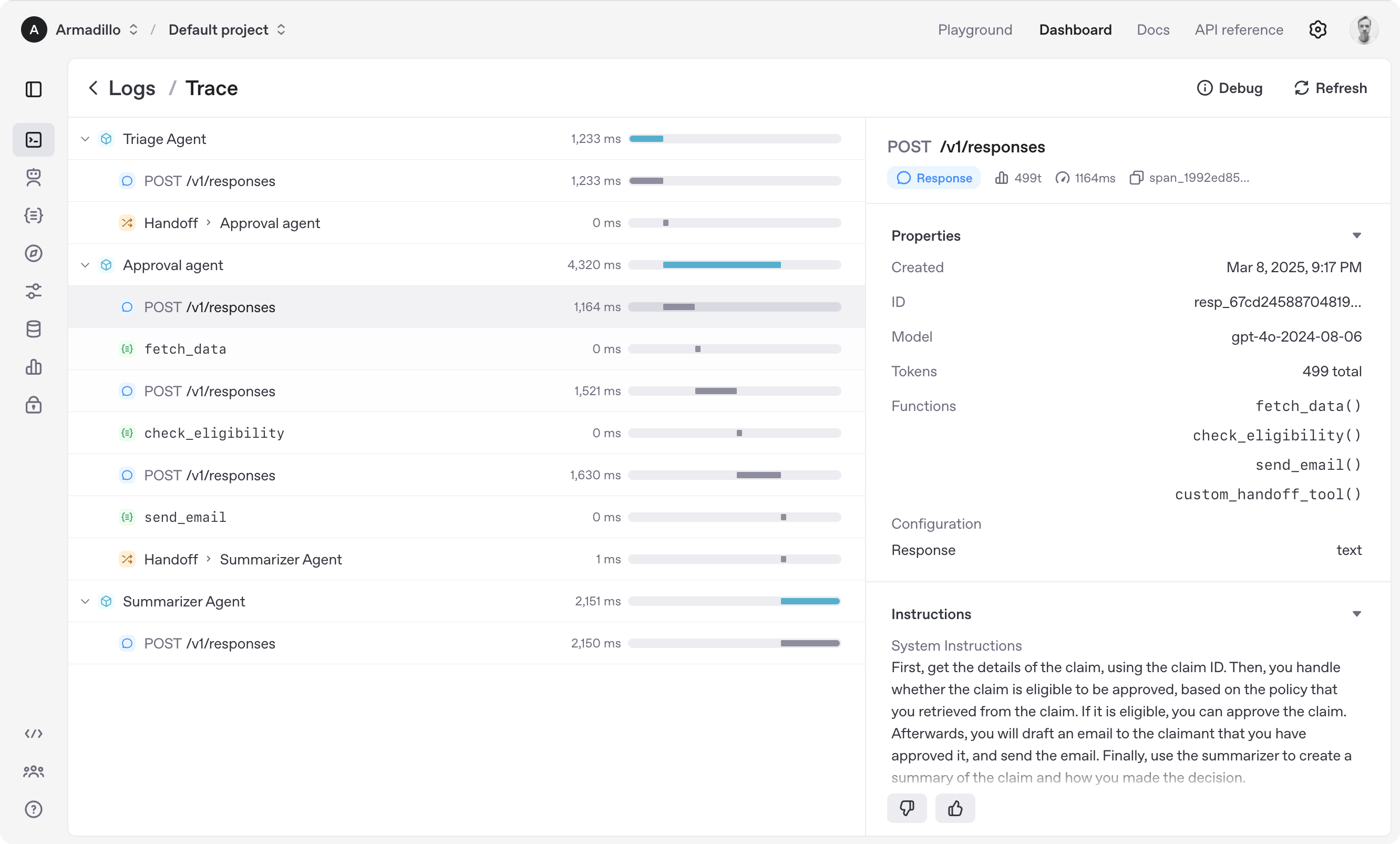
Tracing
The Agent SDK automatically traces your agent runs, making it easy to track and debug the behavior of your agents. Tracing is extensible by design, supporting custom spans and a wide variety of external destinations, including Logfire, AgentOps, Braintrust, Scorecard, and Keywords AI. For more details about how to customize or disable tracing, see Tracing.
Development (only needed if you need to edit the SDK/examples)
- Ensure you have
uvinstalled.
uv --version
- Install dependencies
make sync
- (After making changes) lint/test
make tests  # run tests
make mypy   # run typechecker
make lint   # run linter
Acknowledgements
We'd like to acknowledge the excellent work of the open-source community, especially:
We're committed to continuing to build the Agent SDK as an open source framework so others in the community can expand on our approach.
Extension Examples
Web3 Agent
from agents import Agent, Runner
from agents.extensions.web3 import Web3Agent, AgentWallet

# Create wallet for agent
wallet = AgentWallet.from_mnemonic("your mnemonic here")

# Create Web3-enabled agent
trader = Web3Agent(
    name="Crypto Trader",
    instructions="You are a cryptocurrency trading agent",
    wallet=wallet
)

# Agent can now use wallet tools
result = await Runner.run(trader, "Check my ETH balance")
TEE (Confidential) Agent
from agents import Agent, Runner
from agents.extensions.tee import ConfidentialAgent, TEEProvider

# Create agent that runs in TEE
confidential_agent = ConfidentialAgent(
    name="Secure Agent",
    instructions="You handle sensitive data",
    tee_provider=TEEProvider.INTEL_SGX
)

# Generate attestation
attestation = await confidential_agent.generate_attestation()
print(f"Attestation: {attestation.quote}")
Marketplace Agent
from agents import Agent
from agents.extensions.marketplace import AgentMarketplace, ServiceOffer, ServiceType

# Create agent that offers services
service_agent = Agent(
    name="Research Agent",
    instructions="You conduct research"
)

# Create service offer
offer = ServiceOffer(
    id="research-1",
    agent_address="0x...",
    agent_name="Research Agent",
    service_type=ServiceType.RESEARCH,
    price_eth=0.01,
    description="Comprehensive research services"
)

# Register on marketplace
marketplace = AgentMarketplace()
await marketplace.register_offer(offer)