zeekayandHanzo Dev
04b66be987
zeekayandHanzo Dev
04b66be987
@hookform/resolvers 5 types a zod resolver as input in, output out: the
form holds z.input of its schema, and only handleSubmit sees z.output. The
flows spelled their forms as the output and dropped the input on the floor,
where a default or a transform makes the two differ: signers' actionAuth and
distributionMethod have defaults, and field meta takes `{}` and makes it
undefined.

Each flow's schema now exports its input beside its output, and whatever
holds or passes on the form's values uses it: the clipboard and last-active
field, the field item, its content and tooltip (which re-parse the meta
anyway), the email checkboxes, and every autosave. Autosave reads
getValues(), which is what the user typed, not what the schema made of it,
so it is typed as that all the way to the mutation, whose request type is
now z.input of the request schema — what the server parses.

Three reads of form state now apply the schema's own default where the
value may be unset: `actionAuth ?? []` in both signer steps and
`distributionMethod ?? EMAIL` in the subject step. Every writer in those
forms sets the value, so nothing reachable changes. Two `value &&
onChange(value)` statements become ifs, which typescript-eslint 8 asks for.

Co-authored-by: Hanzo Dev <[email protected]>

The Open Source DocuSign Alternative.
Learn more »
Discord
·
Website
·
Issues
·
Upcoming Releases
·
Roadmap






About Hanzo eSign
Signing documents digitally should be fast and easy and should be the best practice for every document signed worldwide. This is technically quite easy today, but it also introduces a new party to every signature: The signing tool providers. While this is not a problem in itself, it should make us think about how we want these providers of trust to work. Hanzo eSign aims to be the world's most trusted document-signing tool. This trust is built by empowering you to self-host Hanzo eSign and review how it works under the hood.
Join us in creating the next generation of open trust infrastructure.
Recognition


Community and Next Steps 🎯
- Check out the first source code release in this repository and test it.
- Tell us what you think in the Discussions.
- Join the Discord server for any questions and getting to know to other community members.
- ⭐ the repository to help us raise awareness.
- Spread the word on Twitter that Hanzo eSign is working towards a more open signing tool.
- Fix or create issues, that are needed for the first production release.
Contributing
- To contribute, please see our contribution guide.
Contact us
Contact us if you are interested in our Enterprise plan for large organizations that need extra flexibility and control.

Tech Stack



- Typescript - Language
- ReactRouter - Framework
- Prisma - ORM
- Tailwind - CSS
- shadcn/ui - Component Library
- react-email - Email Templates
- tRPC - API
- @hanzo/esign-pdf-sign - PDF Signatures (launching soon)
- React-PDF - Viewing PDFs
- PDF-Lib - PDF manipulation
- Stripe - Payments
Local Development
Requirements
To run Hanzo eSign locally, you will need
- Node.js (v22 or above)
- Postgres SQL Database
- Docker (optional)
Developer Quickstart
Note
: This is a quickstart for developers. It assumes that you have both docker and docker-compose installed on your machine.
Want to get up and running quickly? Follow these steps:
- Fork this repository to your GitHub account.
After forking the repository, clone it to your local device by using the following command:
git clone https://github.com/<your-username>/hanzo-sign
-
Set up your
.envfile using the recommendations in the.env.examplefile. Alternatively, just runcp .env.example .envto get started with our handpicked defaults. -
Run
npm run dxin the root directory- This will spin up a postgres database and inbucket mailserver in a docker container.
-
Run
npm run devin the root directory -
Want it even faster? Just use
npm run d
Access Points for Your Application
-
App - http://localhost:3000
-
Incoming Mail Access - http://localhost:9000
-
Database Connection Details
- Port: 54320
- Connection: Use your favorite database client to connect using the provided port.
-
S3 Storage Dashboard - http://localhost:9001
Developer Setup
Manual Setup
Follow these steps to setup Hanzo eSign on your local machine:
- Fork this repository to your GitHub account.
After forking the repository, clone it to your local device by using the following command:
git clone https://github.com/<your-username>/hanzo-sign
-
Run
npm iin the root directory -
Create your
.envfrom the.env.example. You can usecp .env.example .envto get started with our handpicked defaults. -
Set the following environment variables:
- NEXT_PRIVATE_AUTH_SECRET
- NEXT_PUBLIC_WEBAPP_URL
- BASE_PATH
- DATABASE_URL
- NEXT_PRIVATE_SMTP_FROM_NAME
- NEXT_PRIVATE_SMTP_FROM_ADDRESS
-
Create the database schema by running
npm run prisma:migrate-dev -
Run
npm run translate:compilein the root directory to compile lingui -
Run
npm run devin the root directory to start -
Register a new user at http://localhost:3000/signup
- Optional: Seed the database using
npm run prisma:seed -w @hanzo/esign-prismato create a test user and document. - Optional: Create your own signing certificate.
- To generate your own using these steps and a Linux Terminal or Windows Subsystem for Linux (WSL), see Create your own signing certificate.
Run in Gitpod
- Click below to launch a ready-to-use Gitpod workspace in your browser.

Run in DevContainer
We support DevContainers for VSCode. Click here to get started.
Video walkthrough
If you're a visual learner and prefer to watch a video walkthrough of setting up Hanzo eSign locally, check out this video:
Docker
We provide a Docker container for Hanzo eSign, which is published on both DockerHub and GitHub Container Registry.
- DockerHub: https://hub.docker.com/r/hanzo-sign/hanzo-sign
- GitHub Container Registry: https://ghcr.io/hanzo-sign/hanzo-sign
You can pull the Docker image from either of these registries and run it with your preferred container hosting provider.
Please note that you will need to provide environment variables for connecting to the database, mailserver, and so forth.
For detailed instructions on how to configure and run the Docker container, please refer to the Docker README in the docker directory.
Self Hosting
We support a variety of deployment methods, and are actively working on adding more. Stay tuned for updates!
Fetch, configure, and build
First, clone the code from Github:
git clone https://github.com/hanzoai/esign.git
Then, inside the hanzo-sign folder, copy the example env file:
cp .env.example .env
The following environment variables must be set:
NEXT_PRIVATE_AUTH_SECRETNEXT_PUBLIC_WEBAPP_URLBASE_PATHDATABASE_URLNEXT_PRIVATE_SMTP_FROM_NAMENEXT_PRIVATE_SMTP_FROM_ADDRESS
If you are using a reverse proxy in front of Hanzo eSign, don't forget to provide the public URL for the
NEXT_PUBLIC_WEBAPP_URLvariable!
Now you can install the dependencies and build it:
npm i
npm run build
npm run prisma:migrate-deploy
Finally, you can start it with:
cd apps/remix
npm run start
This will start the server on localhost:3000. For now, any reverse proxy can then do the frontend and SSL termination.
If you want to run with another port than 3000, you can start the application with
next -p <ANY PORT>from theapps/remixfolder.
Run as a service
You can use a systemd service file to run the app. Here is a simple example of the service running on port 3500 (using 3000 by default):
[Unit]
Description=hanzo-sign
After=network.target

[Service]
Environment=PATH=/path/to/your/node/binaries
Type=simple
User=www-data
WorkingDirectory=/var/www/hanzo-sign/apps/remix
ExecStart=/usr/bin/next start -p 3500
TimeoutSec=15
Restart=always

[Install]
WantedBy=multi-user.target
Railway

Render

Koyeb

Elestio

Troubleshooting
I'm not receiving any emails when using the developer quickstart.
When using the developer quickstart, an Inbucket server will be spun up in a docker container that will store all outgoing emails locally for you to view.
The Web UI can be found at http://localhost:9000, while the SMTP port will be on localhost:2500.
Support IPv6
If you are deploying to a cluster that uses only IPv6, You can use a custom command to pass a parameter to the Remix start command
For local docker run
docker run -it hanzo-sign:latest npm run start -- -H ::
For k8s or docker-compose
containers:
  - name: hanzo-sign
    image: hanzo-sign:latest
    imagePullPolicy: IfNotPresent
    command:
      - npm
    args:
      - run
      - start
      - --
      - -H
      - '::'
I can't see environment variables in my package scripts.
Wrap your package script with the with:env script like such:
npm run with:env -- npm run myscript
The same can be done when using npx for one of the bin scripts:
npm run with:env -- npx myscript
This will load environment variables from your .env and .env.local files.
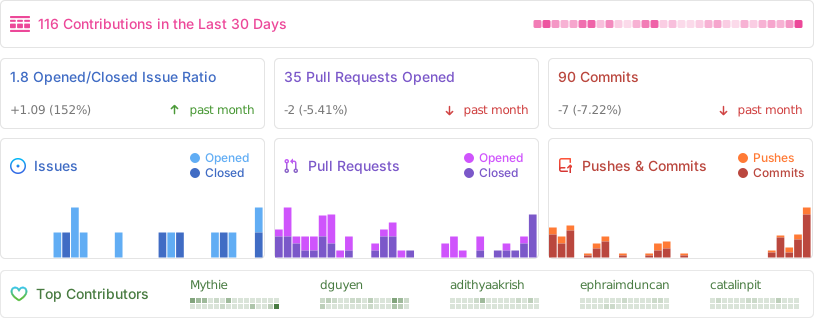
Repo Activity